Getting Started with Public Vector
A 5-minute walkthrough — with video.
Public Vector is a tool for visibility into what kind of data websites and apps are tracking, where they are sending data, and how these actions compare with what they represent to their users. Essentially, it lets you investigate the backend network traffic of apps and websites without needing to hire an expert or understand computer science yourself. Our database is set up to allow for easy and reliable overviews of potential privacy violations in a huge (and growing) library of online entities. It is designed to be both thorough and simple to use, and everything you need to know about how it works is explained on this page.
1. What you’re looking at
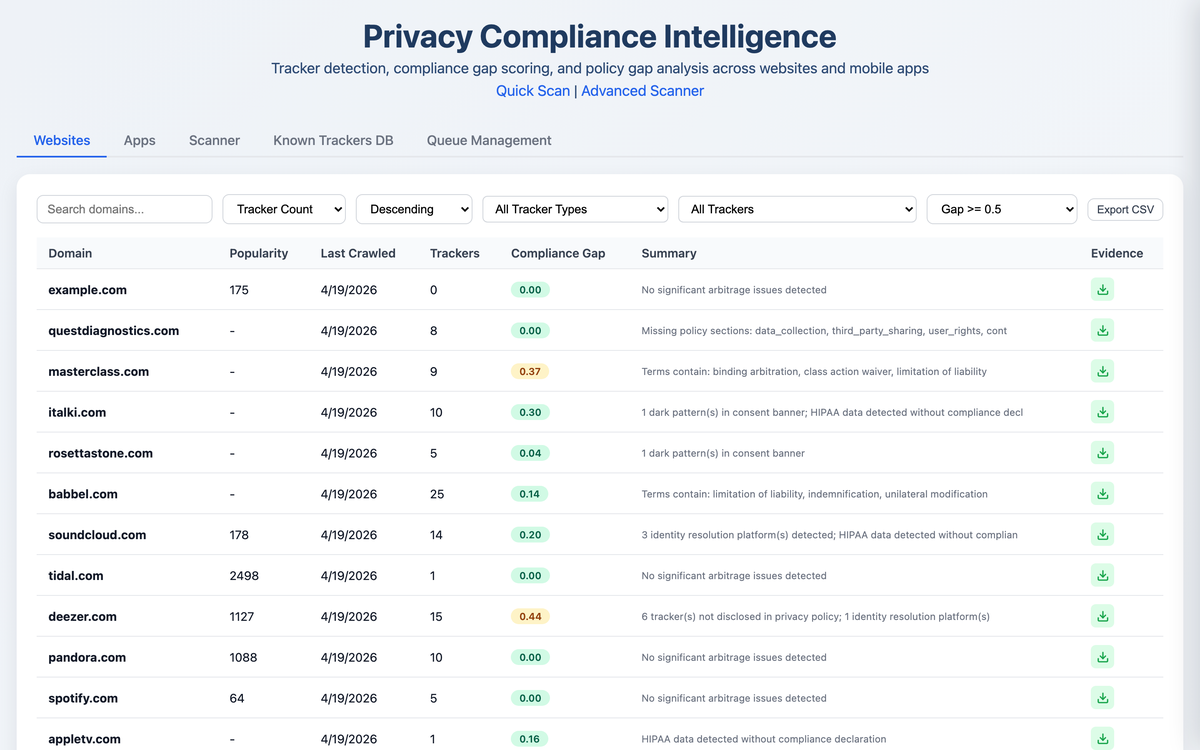
The main interface is the compliance database — 100,000+ websites and 25,000+ mobile apps, sortable by disclosure-gap score, tracker count, vendor mix, or industry. Two top-level tabs:
- Websites — the default view; one row per domain.
- Apps — Android (APK static analysis + live traffic capture) and iOS (manifest + iTunes metadata).
A third tab, Dark Patterns, aggregates manipulative-consent findings across the whole dataset.
2. Browsing & filtering
The top of the page has a search box (matches domain), a sort selector, and a
min-arbitrage-score filter. The arbitrage score (0.00–1.00)
measures the gap between what a site does and what it discloses — higher
means a wider gap. Set ≥ 0.5 to surface defendants worth pleading
against; ≥ 0.8 to surface the most blatant misrepresentation cases.
You can also click any column header to re-sort by tracker count or last-crawled date.
3. Drilling into a defendant
Click any row to open a detail drawer. The drawer is organized top-to-bottom as the disclosure-gap scorecard:
- Compliance Gap section — the headline score plus its components: undisclosed trackers, missing policy sections, PHI captured without HIPAA notice, trackers firing before consent.
- Third-Party Data Recipients — every tracker observed firing, named, categorized (analytics / ads / session_replay / data_broker / identity / marketing / other), and attributed to the receiving corporate entity.
- Personal & Sensitive Data Findings — PII, PHI, video viewing, biometric-class data leaks, with the regulatory framework that applies (HIPAA, BIPA, VPPA, GDPR).
- Manipulative / Deceptive Patterns — classified by modal-type and severity (cookie banner dark patterns, newsletter wall, etc.).
- Screenshots timeline (where available) — the actual rendered pages from the crawl, timestamped.
Below is a 30-second walk-through on a real defendant, sixt.com (0.88 disclosure-gap score).
Top-to-bottom walkthrough of the disclosure-gap scorecard. The full record from one crawl, all in one drawer.
4. Per-tracker drill-down
Each tracker card in the drawer is expandable. The expansion shows:
- PII flag pills — red badges for Email, Phone, User ID, Advanced Match, Session Replay (whichever the tracker is set up to capture).
- Identity signals — the platforms each tracker cross-matches with (e.g. LiveRamp, IdentityIQ, Acxiom).
- Live HAR capture PROFESSIONAL — the actual request URLs observed during the crawl, with PII query parameters highlighted in red. This is the on-the-wire interception evidence.
Zoom into one tracker on hubspot.com. Identity flags, HAR-format request capture, PII parameters highlighted in red.
5. Evidence export PROFESSIONAL
From any site or app drawer, the small download icon (top-right of the row in the list view) opens the Evidence view — a citation-ready bundle that combines every tracker, every request, every PHI/PII finding, and the raw HAR-format URLs into one rich preview. A “Download JSON” button at the top exports the full evidence file. Use this as the factual record attached to a demand letter or complaint. PDF reports are also available on the Professional plan via the API.
Evidence bundle for jetblue.com — 19 trackers, 18 transmitting PII, 8 PHI findings including a session-replay vendor.
6. Dark patterns view
The Dark Patterns tab aggregates consent-banner findings across the whole dataset, classified by pattern type:
- hidden_reject — no visible reject button on the cookie banner
- asymmetric_buttons — accept and reject are visually unequal in prominence
- pre_checked — consent boxes pre-checked by default
- forced_wall — you can’t use the site at all without accepting
Use the modal-type filter to slice (cookie banners only, newsletter walls only, etc.) and click any row to drop into the site drawer with the per-finding evidence cards.
Healthcare consent violation on irhythmtech.com — 13 trackers, 12 transmitting PHI/PII, 4 regulated-data findings, 5 manipulative-pattern cookie-modal evidence cards.
7. Mobile (Android + iOS)
Switch to the Apps tab. Each app shows:
- Static analysis — declared permissions (with dangerous ones flagged), embedded SDK signatures (matched against Exodus Privacy and DuckDuckGo Tracker Radar), and installation evidence.
- Live traffic PROFESSIONAL — for apps captured under emulator, the per-request HAR view with PII filtering and a screenshot timeline of the user session.
The same disclosure-gap scoring methodology applies: declared trackers / permissions vs. observed behavior.
How live traffic capture works
Static APK analysis tells you what an app can do — its declared permissions, its embedded SDK signatures. Live traffic capture tells you what it actually does. The two together produce the disclosure-gap picture on the mobile side.
Behind the scenes, Public Vector runs a real Android emulator with the app installed, then routes the device’s network traffic through a man-in-the-middle proxy (mitmproxy) with a trusted CA certificate pre-installed on the OS image. The app is exercised — onboarding, browsing, a handful of screen interactions — while every HTTP and HTTPS request and response is decrypted, recorded, and saved to a HAR file. Screenshots of each step are timestamped alongside the network capture so the two timelines line up. iOS coverage uses the same proxy approach against a paired physical device.
The captured HAR is then run through the same tracker-identification engine that handles website crawls: vendors named, request URLs parsed for PII parameters, request bodies inspected, identity signals extracted. What you see in the app drawer’s Traffic Evidence section is the post-processed result — per-request cards with the URL, the PII fields detected, and the body preview where sensitive data is highlighted.
Why this matters for legal work: static analysis alone can be challenged (“the SDK is embedded but maybe it never fires”). A live HAR capture shows the request on the wire, with timestamp, headers, and contents — the interception element of an ECPA, CIPA, or VPPA claim, documented.
8. Free access vs. Professional plan
| Capability | Free (no account) | Professional ($400/mo) |
|---|---|---|
| Browse the database | ✓ | ✓ |
| Drill into any site or app | ✓ | ✓ |
| Disclosure-gap scorecards | ✓ | ✓ |
| Live HAR capture & PII drill-down | — | ✓ |
| Evidence-bundle JSON export | — | ✓ |
| PDF reports | — | ✓ |
| Custom scans on any site / app | — | unlimited |
| REST API access | — | ✓ |
The free tier needs no account and no card. Professional is month-to-month, no long-term commitment.
9. Need help?
Email admin@publicvector.io for support, billing, or feature requests. We typically reply within one business day.